之前使用下列 VIM plugin 來打造command line的 sourceinsight
taglist + nerdtree + ctags+ SrcExpl
但最近發現有人寫plugin來整合這些plugin (好饒舌), 讓套件裝起來非常簡易
- Vundle
https://github.com/VundleVim/Vundle.vim
1. 編輯 /etc/vim/vimrc 並貼上下列script
(若要編輯單一user, 則是 /home/<user>/.vimrc)
" ------ Vundle Settings -------
let iCanHazVundle=1
let vundle_readme=expand('~/.vim/bundle/vundle/README.md')
if !filereadable(vundle_readme)
echo "Installing Vundle.."
echo ""
silent !mkdir -p ~/.vim/bundle
silent !git clone https://github.com/gmarik/vundle ~/.vim/bundle/vundle
let iCanHazVundle=0
endif
set rtp+=~/.vim/bundle/vundle/
call vundle#rc()
" ---------- Plugins ----------

Bundle 'MarcWeber/vim-addon-mw-utils'
Bundle 'garbas/vim-snipmate'
Bundle 'wesleyche/SrcExpl'
Bundle 'scrooloose/nerdtree'
Bundle 'vim-scripts/taglist.vim'
Bundle 'wesleyche/Trinity'
"Bundle 'vivien/vim-addon-linux-coding-style'


set foldmethod=marker

" Open and close all the three plugins on the same time
nmap <f6>  :TrinityToggleAll<CR>
" Open and close the srcexpl.vim separately
nmap <f7>  :TrinityToggleSourceExplorer<CR>
" Open and close the taglist.vim separately
nmap <f8>  :TrinityToggleTagList<CR>
" Open and close the NERD_tree.vim separately
nmap <f9> :TrinityToggleNERDTree<CR>
" Back to last modified line
2. 執行vi輸入
:PluginInstall
即可完成安裝!
3. 接著在程式碼根目錄下執行
ctags -R .
來幫所有的程式碼建tags
note: 若沒有安裝ctags, Debian/ Ubuntu 請輸入 apt-get install ctags 以安裝套件
4. 編輯檔案
按下F6即可啟動 (若要單一開啟, 請參照設定 – F7 ~ F9)
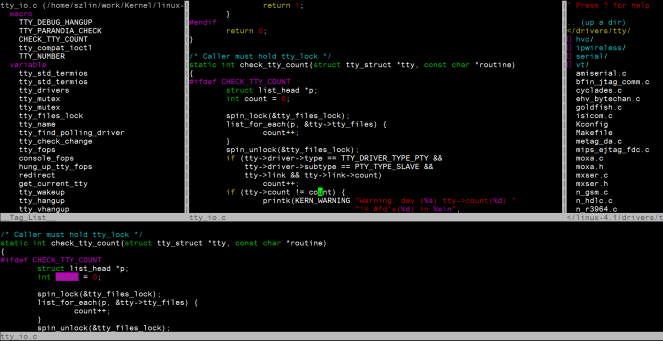
再按一下F6即全部關閉.
除此之外可再自行安裝想要的 vim plugin, 簡簡單單就可以打造自己的 “sourceinsight"
 SZ Lin with Cybersecurity & Embedded Linux
Hi nice reading yourr blog
讚讚